
Color Blindness Tools

This page shall bring together a series of tools related to color blindness. If you are colorblind you might know the situation, that you are looking for the right tool to accomplish a certain task. And it is not easy to find the right one when colors are involved and not colorblind people are providing it.

I hope with this page I can build up nice list of color blindness related tools to help you as a colorblind person in many situations. Or they even can be very interesting for not colorblind visitors.

Color Name & Hue
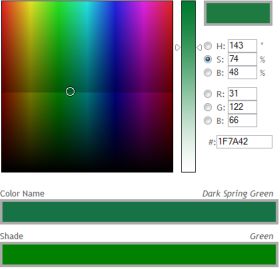
Do you know the feeling that you see a certain color but can’t say to which main hue this color belongs to? To somebody with a severe color blindness this is something that happens many times a day and something you get used to.

Color Name & Hue
Color Name & Hue

Color Name & Hue can help you out. However you need at least the RGB, HSB or Hex value of the color to find the closest matching color name and its corresponding main hue—with the help of the tool.

It is also possible to just slide around the color spectrum and get a feeling of the 1640 different color names and their corresponding hues.

I often find a color which I just can’t categorize—is it blue or purple, brown or green, red or orange—and Color Name & Hue provides me with the correct answer.


Coblis — Color Blindness Simulator
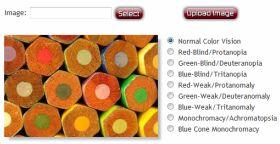
Do you know how it looks like to be colorblind? You surely know that our colorful world looks different. But it is hard to imagine how a color vision deficiency exactly changes your color perception.

Color Blindness Simulator

My Color Blindness Simulator called Coblis is the right tool to give you an impression of how a colorblind person sees the world. Just transform the sample picture to see how it looks like if you would be red-, green-, blue- or completely colorblind.

You can even upload you own images and see how they change their color spectrum while flipping through the different forms of color vision deficiency. Just try it out.


21 Responses to “Color Blindness Tools”

  1. Willy Schmidhamer Says:

    Dear Sir,

    Great Tools.

    Are your Color Tools free usable ?
    Wen yes, where is’t to download.

    With regards,

    willy Schmidhamer

  2. Daniel Flueck Says:

    Willy, up to now I’ve only release Color Name & Hue, which is an online tool and therefore can’t be downloaded onto your computer. In future I might also develop something for offline usage.

  3. Brian W Says:

    Just thought I’d mention a great little program that I’ve used for years. It’s called WhatColor.

    http://www.hikarun.com/e/

  4. Daniel Flück Says:

    Brian, thanks for the link. I also had a look at this tool and hope to write an article about it soon.

  5. Carsten Says:

    If that would be available as a standalone program now, or as a plugin for Photoshop … nice tool.

  6. tom Says:

    If this could be a plug-in for photoshop that would be a godsend!

    Your tool is fabulous, but limiting for me because I cannot use it offline.

    Great work – let’s get it off-line!

  7. Rob Says:

    My son is moderately colorblind. He is a 3.9 GPA high school student. He is wanting to select a career path in the math and science fields. Does anyone know of a list of careers that colorblind people cannot do? I know Electrician and Pilot are out.

  8. John Says:

    considering a carer in medicine?
    check out http://www.colourmed.com/study.html

  9. alon elbaz Says:

    Hi – I am a color blind designer – is there any pantone chart or service that include the names of colors? But I need also the generic color names as Blue, Green etc…

  10. digi cipriani Says:

    thank you very much. it’s a big help for us espwcially for color blind person. more power.

  11. Kevin Says:

    It is possible to still fly for a living with minor color blindness. He can go to the local FSDO and take a SODA test. (Statement Of Demonstrated Ability) They will take him out to the control tower and flash a light gun at him. It has a Red, Green, and clear lense on it. If he can tell the difference between the three colors, he passes and can even fly for the airlines if he passes all the other physical requirements.

  12. Kevin Says:

    I meant to post this before:
    This is regarding the requirements to obtain a flight physical.

    Applicants for medical certification must be able to see the colors they need to perform airman duties safely. Aviation Medical Examiners (AMEs) check color vision by using special color plates. If you can’t pass the initial color vision test but otherwise meet medical standards, we may issue you a medical certificate with the limit “NOT VALID FOR NIGHT FLIGHT OR BY COLOR SIGNAL CONTROL.”

    If you have a medical certificate bearing a color vision limitation, you may request reevaluation by writing to:

    Aerospace Medical Certification Division, AAM-300
    Federal Aviation Administration
    Civil Aerospace Medical Institute
    P.O. Box 25082
    Oklahoma City, OK 73125

    The AME will ask you to demonstrate your ability to perform tasks that require color vision by giving you a signal light test. The Aerospace Medical Certification Division will consider the results of the test in reevaluating you.

  13. Stephanie Mayes Says:

    Does anyone know of any colouring pens with the name of the colour written on it?

    Many thanks in advance

  14. Dr. Ali Hussain Says:

    Hi,
    I am an Contact Lens Manufacturing Company, Our Company also manufactures X-Chrome Soft Contact Lenses for Colour Blind Patient, mostly 99% patient are corrected by it, if any one interested can contact me
    Thanks

    Dr. Ali Hussain
    Director-Ali’s Eye Care Clinic
    M.D- Ali’s Ophthalmic Lens Division (Manufacturer, Wholesaler & Exporter)

    Head Office Address: Shop No 1, KSA Regency, 2nd Ripon Cross Lane, Hussaini baug, Madanpura, Mumbai 400008, India

    Tel: +91-9867111284

    Email: aliseyecare@yahoo.com

  15. Hanamiti Says:

    Hey, that is a great set of tools! Thank you for bringing them together.

  16. Lisa Says:

    Have you heard of Color Oracle?
    It simulates three types of color blindness for the whole screen: http://colororacle.cartography.ch/

  17. MrBoire Says:

    Hello,

    I have been looking for a tool for the computer for color blind people, something that would allow me to see the differences between the colors on computer monitors that give me a problem.

    Many websites, games and software are not produced with colorblind persons in mind and are difficult to navigate, play or use by us.

    I have been experimenting with adjusting the color setting on the monitor, but as I do not see colors like the unfortunate 90% of the population who are afflicted with full color vision, I have had a difficult time.

    Thanks

  18. Rich Says:

    do you have a tool like the color blindness simulator that will simulate color vision for those of us with mild color blindness?

    thanks

  19. Ben Says:

    Hello, my company is developing an app for ‘Clothes Matching.’ This app is for business men and will create outfits automatically from your existing business wear; Suits, Dress Shirts, Neckties,etc. All you would do is input the clothing from your closet using graphic illustrations on the desktop and the outfits will be put together for you automatically. Depending on the degree of Color Blindness you experience you may or may not require assistance during the initial input phase: Example, if you know that a suit is Navy and not Black you would just click on the appropriate graphic. After that adding individual pieces should be easy and not require any assistance. I’m very interested in what you think. Please feel free to email me with your questions and/or comments. Thank you. Email: ben@re-dress.net

  20. Andy Says:

    I agree with many of the comments. A desktop application should be made using the colour naming technology of this online page.

    I have tried whatcolor on windows 7 and it calls every colour that I mouseover as black.

    I prefer the page on this website and the way the colours are named really describes them for the colour blind.

    Please make a desktop app so we can have the colour name popup with our mouse pointer.

  21. Color Me Impressed: Design and Color Blindness » A Better UX - User experience tips for digital marketing professionals by Sean Turner Says:

    [...] help you understand how your materials will appear to these readers; many of which can be found via colblindor.com, a useful site with many handy resources and articles on the [...]

Please also consider to share your information or ask your question at the Color Blindness Forum, a place where people can find inputs, share stories, ask questions and more—all about color blindness. Join the colorblind community!

Leave a Comment